Wink is the AI video and photo enhancer that fixes any clip in one tap. Upscale to 4K HD, restore old videos, unblur photos — old home videos, phone footage, whatever you’ve got.
[ PERFECT FOR ]
Restoring old family videos, VHS tapes, and home movies
Fixing blurry, shaky, or low-quality phone footage
Upscaling videos for trending short-form video platforms
Reviving faded photos and damaged memories
Polishing night-out clips, travel vlogs, and gaming highlights
Anyone who wants pro-quality video without the editing skills
[ VIDEO & PHOTO ENHANCER ]
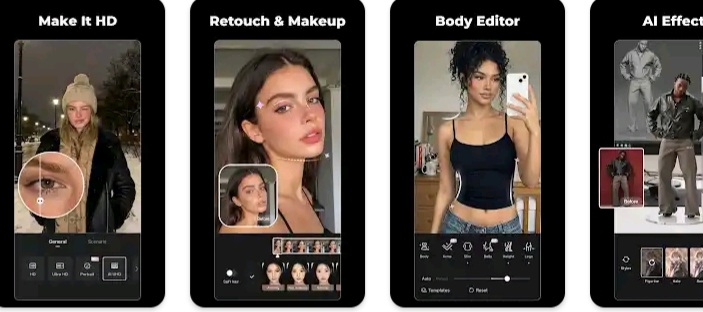
HD Quality Enhancer: Fix blurry, low-quality videos and photos — no editing skills needed
4K Super Resolution: Upscale 480p and 720p videos into crisp 4K Ultra HD
Adjustable Enhancement: Fine-tune the fix strength to keep results natural — no over-processed AI look
7 Scene-Specific Models: Dedicated fixes for gaming clips, night-out footage, old photo restoration, and more
AI Repair Pro: Auto mode detects quality issues and applies the best fix, or switch to Basic to manually tune color, night view, and denoise
Batch Fix: Enhance multiple videos and photos — save hours of editing
Unblur Video: Sharpen out-of-focus clips and rebuild lost detail
Old Video Restore: Bring faded, pixelated, or damaged footage back to life
[ VIDEO RETOUCH ]
Fill Light: Brighten faces and fix uneven lighting for natural, flattering portraits
Hair Color Changer: Try new hair colors in seconds — instantly preview before you commit
Wrinkle & Eye Bag Removal: Soften fine lines and fatigue with natural-looking results
Teeth Whitening: Get a brighter smile with a single tap
Skin Retouch: Smooth skin and clear up acne while keeping a natural texture
Face Enhance & Jawline Refine: Subtle contouring that moves naturally with you
Body Editor & Shape Adjustment: Refine your ideal look with our background-lock feature
Makeup Filters: Polished looks that hold up in motion
Multi-Face Detection: Edit each person in a group video separately
[ CREATIVE EFFECTS ]
DigiCam Effect: Recreate the viral Y2K digital camera aesthetic
Live Wallpaper: Turn photos into adorable animated wallpapers
Auto Subtitles: Generate accurate captions in 10+ languages — perfect for social clips
Anime, Cartoon & Avatar Styles: Transform any photo into fun artistic looks in seconds
Trending Effects: New viral styles added every month
[ WHY WINK ]
Built by Meitu — over 1 billion installs worldwide
Trusted by millions to restore old memories and create viral content
Privacy-first: your videos are processed securely and never shared
New AI models and effects added every month
Works on any video — old home videos, phone clips, social content
[ WINK VIP ]
Unlock premium features and exclusive effects with Wink VIP.
Unlimited 4K video enhancement
All premium AI models and scene-specific fixes
Exclusive filters and effects
Watermark-free exports
Priority processing
[ Subscription Info ]
Subscriptions are billed weekly, monthly, or annually to your Google Play account and auto-renew unless canceled at least 24 hours before the end of the billing period. Manage or cancel anytime in your Google Play subscription settings.
Bl3:-Blur, redact & hide sensitive info in photos. 100% offline. No uploads.
Redactly — Blur, Redact & Hide Sensitive Info in Photos & Screenshots
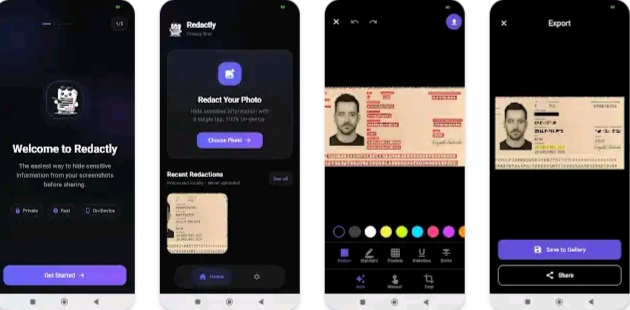
Share photos and screenshots without sharing your secrets. Redactly is a fast, private way to blur faces, black out text, and hide personal information in any image — right on your phone. No accounts. No photo uploads. Your images never leave your device.
Whether you’re posting a receipt online, sharing a chat screenshot, uploading a travel pic, or sending a document — Redactly lets you cover sensitive bits in seconds.
✓ WORKS OFFLINE — Redaction happens on your device. No photo uploads. ✓ AUTO-DETECT TEXT — Tap once to find text in your image; tap again to hide it. ✓ MANUAL BLACK BARS — Draw precise redaction bars over anything you want gone. ✓ MULTIPLE STYLES — Solid black, blur, pixelate, or mosaic. Pick what fits. ✓ CLEAN, FAST UI — No clutter. No learning curve. Open, redact, share. ✓ NO WATERMARK — Your image, your way.
━━━━━━━━━━━━━━━━━━━━ ★ WHAT YOU CAN REDACT ━━━━━━━━━━━━━━━━━━━━
Names, addresses, phone numbers
Account details and payment info
Email addresses and usernames
Faces and license plates
Chat messages and screenshots
Location info and house numbers
Tickets, receipts, boarding passes
ID numbers and personal documents
Any sensitive text or image detail
━━━━━━━━━━━━━━━━━━━━ ★ HOW IT WORKS ━━━━━━━━━━━━━━━━━━━━
Open a photo from your gallery or import a screenshot.
Let Redactly auto-detect text, or draw a black bar yourself.
Choose your style — solid, blur, pixelate, or mosaic.
Save a flattened copy. Share it anywhere.
When you save, the redaction is baked into the image — no edit history, no layers to peel back.
━━━━━━━━━━━━━━━━━━━━ ★ BUILT FOR PRIVACY ━━━━━━━━━━━━━━━━━━━━
Many blur and censor apps send your photos to the cloud. Redactly doesn’t. Your image never leaves your phone. No account. No email. No ads. No trackers.
If privacy matters to you, Redactly is built the way you’d build it yourself.
━━━━━━━━━━━━━━━━━━━━ ★ PERFECT FOR ━━━━━━━━━━━━━━━━━━━━
Sharing screenshots on social media
Posting receipts and proofs
Selling online (hide personal info on listings)
Journalists, researchers, and students
Sharing family photos online
Sending documents over chat apps or email
Reporting bugs with clean screenshots
━━━━━━━━━━━━━━━━━━━━ ★ FEATURES AT A GLANCE ━━━━━━━━━━━━━━━━━━━━
Mx2:-Mx1 tunnel pro provide fast and reliable service
Fast & Reliable VPN
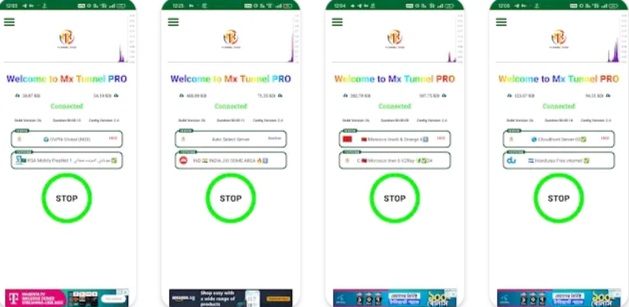
Secure your connection and unblock geo-restricted websites by using MX TUNNEL PRO
Features: ✅ Free, no need payment! ✅ Secures your connection ✅ Bypass Geo-Restrictions ✅ Bypass Network-Restrictions ✅ Multiple Protocol Supported
In today’s hyper-connected world, launching an online business is more appealing than ever. Whether you’re looking to escape the 9-to-5 grind or tap into a rising market trend, the internet provides countless opportunities for creative entrepreneurs. Below are some of the most promising online business ideas that can thrive in the current digital environment:
E-Commerce Ventures Online retail continues to boom, opening doors for anyone eager to build a digital storefront. Platforms like Shopify, Etsy, and WooCommerce make it easy to launch an online store—whether you’re selling custom-made goods or niche products. Success in this space often hinges on product uniqueness, excellent user experience, and strategic digital marketing.
Online Coaching & Consulting If you’re knowledgeable in areas like business, fitness, or personal development, offering virtual coaching or consulting can be highly rewarding. Tools such as Zoom for meetings, Teachable for courses, and social media for outreach make it simple to connect with a global audience.
Digital Marketing Services Companies of all sizes are investing heavily in online marketing. If you’ve got skills in SEO, content creation, social media, or PPC ads, offering digital marketing services can become a solid income stream. Both agencies and solo freelancers thrive by boosting their clients’ online reach.
Affiliate Marketing This model allows you to earn commissions by promoting other companies’ products. By building a blog, website, or social presence around a specific niche, you can attract interested buyers. A strong grasp of SEO and content strategy is essential for success in affiliate marketing.
Dropshipping Businesses With dropshipping, you sell products without handling inventory. Suppliers manage the packaging and shipping, while you focus on sales and customer support. Choosing high-demand niche products and reliable suppliers is key.
Content Creation Bloggers, YouTubers, podcasters, and influencers can generate revenue through ads, sponsorships, merch, and more. To succeed, focus on consistently delivering engaging content and diversifying your income streams.
SaaS (Software as a Service) Tech-savvy entrepreneurs can develop software solutions and offer them via subscription models. Identifying a clear problem and building an intuitive, scalable app is crucial. Hosting platforms like AWS and Google Cloud support rapid growth.
Online Fitness & Wellness Virtual training has surged, making it a great time to offer fitness coaching, yoga sessions, or nutrition plans. Apps like Trainerize and platforms like Instagram or TikTok help you reach and retain clients.
Freelance Services Freelancing offers flexibility and allows you to monetize skills like writing, design, or web development. Sites like Upwork, Fiverr, and Freelancer connect you with clients looking for remote expertise.
Virtual Assistance Businesses increasingly rely on virtual assistants to handle tasks like admin work, customer support, or social media. Niche-specific VA services can become scalable, efficient alternatives to traditional staff.
The digital world is packed with possibilities for those ready to innovate and adapt. Whether you’re drawn to online retail, coaching, content creation, or tech services, success lies in spotting a need, delivering value, and embracing the tools of digital entrepreneurship. With persistence and creativity, you can turn your idea into a thriving online business.
Pd2:-Protection from data usage overages, bandwidth wasting apps, and more!
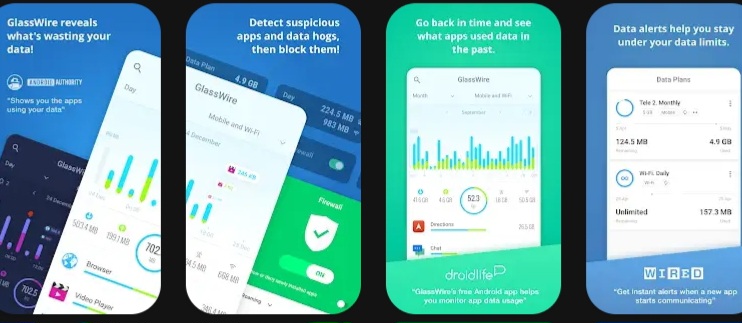
GlassWire is the ultimate data usage monitor for Android! Our app makes it easy to monitor your mobile data usage, data limits, and WiFi network activity. Instantly see what apps are slowing your phone’s Internet connection or wasting your mobile data.
Key features • GlassWire’s data alerts keep you under your data limit and save you money on your monthly phone bill. Get alerted before you reach your carrier data limit to avoid overage fees. • See a graph of which apps are currently using your mobile carrier data or Wi-Fi Internet connection. • Instantly know every time a new app accesses the network and begins using Wi-Fi or mobile data. • Swipe right to go back in time to see which apps used mobile data earlier in the week or month. See past Wi-Fi or mobile usage by day or month. • Go to GlassWire’s “Data Plan” screen to set up zero-rated apps that won’t have their data usage counted against your data plan. GlassWire can also keep track of roaming, and roll-over minutes. Create a data usage widget. • Check GlassWire’s Speed Meter on its notification bar to quickly see real-time data usage. • Help protect your privacy and reveal suspicious app activity through GlassWire’s graph. • Block apps from connecting to the network, or allow or deny new connections before they start with GlassWire’s mobile firewall. Create multiple firewall profiles, one for mobile and one for WiFi. • Have an unlimited plan? Unfortunately, most ‘unlimited’ plans will throttle you (slow & limit your connection) once you user a certain amount of data. GlassWire can alert you when you start to get throttled.
Protecting your privacy – 20 million users protected! Our Windows and Android software combined have been downloaded over 20 million times! We make money through sales of our GlassWire for Windows software, not by selling your data to third parties. With GlassWire your data and app usage information never leave your phone. GlassWire will NEVER show you ads or violate your privacy.
Instantly block badly behaving apps with GlassWire’s firewall Instantly allow or deny new app connections with GlassWire’s new mobile firewall. The Firewall feature is based on a VPN connection (VpnService API) that GlassWire creates to block connections from unwanted applications. GlassWire never uses your personal information for commercial purposes, advertisement, or shares it with third parties.
Supported mobile networks & providers GlassWire’s data manager features work great with many different mobile data providers and telecoms world-wide including Verizon, T-Mobile, Vodaphone, AT&T, Sprint, Magenta, and Jio. It’s also compatible with 3G, 4G, 5G, Edge, GPRS, Wi-Fi, and most other popular telecommunications networks. GlassWire can also provide you with Internet usage alerts if your Cable, DSL, or Satellite ISP has data caps.
All the major Android websites love GlassWire! “10 best privacy apps for your phone” – Android Authority “GlassWire for Android now shows what’s eating up your data” – SlashGear “GlassWire’s free Android app helps you monitor app data usage” – Droid Life “The best Android security apps to lock down your phone” – The Daily Dot
How can we make GlassWire even better? Please join our forum and let us know, or email us We read every email!
Bug & problem reporting Find a bug or another problem? Go to the bottom right three line menu button inside the GlassWire app, then choose “Send Feedback” with debug logs so we can fix the problem.
Thanks for trying GlassWire. We hope we helped protect your privacy along with saving you money in the process.
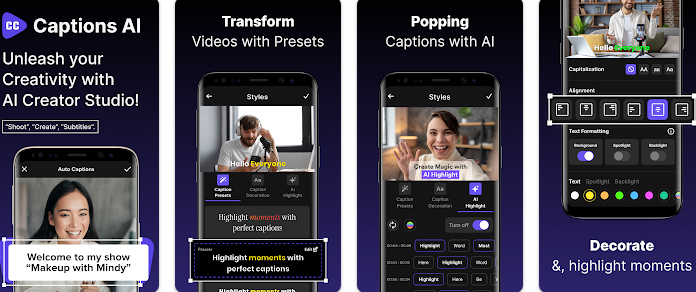
Ctp:-AI Video Editor with Auto AI Captions & Subtitles – The AI Tool for Social Media Creators & Influencers!
Want to create professional-quality videos with captions and subtitles in just a few taps? This AI-powered video editor makes it easy to edit videos, generate auto captions & add subtitles effortlessly. Whether you’re making for Instagram Reels captions, TikTok videos, YouTube Shorts, or vlogs, this app ensures perfectly synced captions & subtitles to enhance engagement.
– Key Features:
-Video Editor – Powerful video editing tools to trim, cut, merge & enhance videos.
-AI Captions & Subtitles – Auto-generate captions & subtitles with Caption AI speech recognition.
– Reels & Video Captions – Create stylish captions & subtitles for social media videos.
– Teleprompter for Video – Read scripts smoothly while recording high-quality videos.
– Teleprompter Video Mode – Perfect for vlogs, presentations, & professional content creation.
– Teleprompter & Captions – Easily add captions while using a teleprompter.
– Customizable Fonts & Text Effects – Add animated captions & subtitles to your videos.
– Trending Filters & Stickers – Enhance your videos with cinematic effects.
– AI-Generated Hashtags – Boost reach with trending hashtags for TikTok, Instagram & YouTube.
– Optimized for Social Media – Export high-quality videos for TikTok, Instagram Reels, YouTube Shorts & Stories!
– Why Choose This AI Video Editor?
– AI-Powered Editing – Smart AI captions & subtitles for quick video creation. -Video Captions & Reels Captions – Perfectly synced captions & subtitles for maximum impact. ✅ Watermark-Free HD Export – Create high-quality videos without branding. ✅ Creative Text Templates – Premade fonts and styles for captions & subtitles. ✅ AI Hashtag Generator – Improve discoverability with smart hashtag recommendations. ✅ Auto Caption Integration – Seamlessly generate AutoCap captions for enhanced engagement. ✅ Teleprompter Video Recorder – Improve video quality with built-in teleprompter.
– Perfect for Content Creators, TikTok, Instagram or YouTube Influencers & Businesses!
Whether you’re making TikTok videos, Instagram Reels, vlogs, or ads, this video maker gives you everything you need to edit, caption, subtitle & share viral videos quickly and easily!
If you’ve tried tools for captions, video editing, subtitle automation, AI-powered text, or stylish Reels captions, you’ll love the advanced features our app offers! Many video creators who rely on captions, subtitles, & professional video editing have used. Now, you can get all those features in one AI-powered video editor designed for effortless video editing, captions, & subtitles!
– How to Use: 1️⃣ Import or record a video. 2️⃣ Edit with AI Video Editor tools: trim, cut, add music & effects. 3️⃣ Auto-generate captions & subtitles using CaptionAI. 4️⃣ Customize Reels Captions & video captions with unique fonts. 5️⃣ Use the teleprompter for video while recording high-quality content. 6️⃣ Export in HD & share on TikTok, YouTube Shorts, Instagram Reels, and Stories!
Download now & start creating trending videos with AI Captions & Subtitles!
Disclaimer: CaptionsAI is an independent application and is not affiliated with, endorsed by, or associated with any other app or their parent companies, including but not limited to Instagram, Facebook, Twitter (X), YouTube or TikTok.
All trademarks, logos, and brand names mentioned in this app and its description are the property of their respective owners. Any references to these app are made purely for descriptive and referential purposes to explain the app’s functionality and are not intended to imply any official association or partnership.
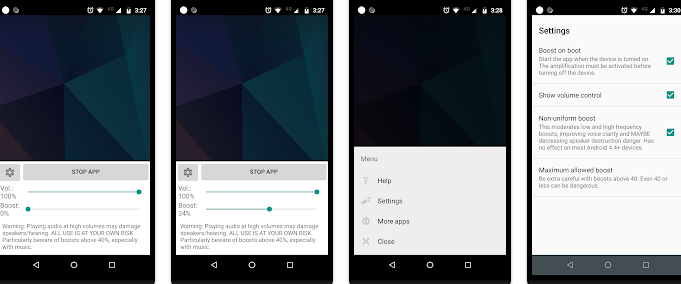
Ssp:-Simple and small app to boost your speaker or headphone sound volume. Useful for movies, audio books and music.
Use at your own risk. Playing audio at high volumes, especially for a prolonged amount of time, can destroy speakers and/or damage hearing. Some users HAVE reported destroyed speakers and earphones. If you hear distorted audio, lower the volume (but it may be too late).
By installing this application you agree that you will not hold its developer responsible for any damage to hardware or hearing, and you are using it at your own risk. Consider this to be experimental software.
Not all devices support this software. Try it at your own risk and see if yours works.
This app does not work on most 4.2.1-4.3 devices. It should work on 4.4 and higher, as well as on devices below 4.2.1.
This is not for adjusting the speakerphone volume in phone calls (that has its own boost, I think), but for adjusting the volume of music, movies and apps.
When you set the boost to zero, Volume Booster will be off. The notification icon is just for ease of launching. If you don’t like seeing the notification icon when Volume Booster is off, just go to Volume Booster’s Settings and set it to appear only when Volume Booster is running. In today’s hyper-connected world, launching an online business is more appealing than ever. Whether you’re looking to escape the 9-to-5 grind or tap into a rising market trend, the internet provides countless opportunities for creative entrepreneurs. Below are some of the most promising online business ideas that can thrive in the current digital environment:
E-Commerce Ventures Online retail continues to boom, opening doors for anyone eager to build a digital storefront. Platforms like Shopify, Etsy, and WooCommerce make it easy to launch an online store—whether you’re selling custom-made goods or niche products. Success in this space often hinges on product uniqueness, excellent user experience, and strategic digital marketing.
Online Coaching & Consulting If you’re knowledgeable in areas like business, fitness, or personal development, offering virtual coaching or consulting can be highly rewarding. Tools such as Zoom for meetings, Teachable for courses, and social media for outreach make it simple to connect with a global audience.
Digital Marketing Services Companies of all sizes are investing heavily in online marketing. If you’ve got skills in SEO, content creation, social media, or PPC ads, offering digital marketing services can become a solid income stream. Both agencies and solo freelancers thrive by boosting their clients’ online reach.
Affiliate Marketing This model allows you to earn commissions by promoting other companies’ products. By building a blog, website, or social presence around a specific niche, you can attract interested buyers. A strong grasp of SEO and content strategy is essential for success in affiliate marketing.
Dropshipping Businesses With dropshipping, you sell products without handling inventory. Suppliers manage the packaging and shipping, while you focus on sales and customer support. Choosing high-demand niche products and reliable suppliers is key.
Content Creation Bloggers, YouTubers, podcasters, and influencers can generate revenue through ads, sponsorships, merch, and more. To succeed, focus on consistently delivering engaging content and diversifying your income streams.
SaaS (Software as a Service) Tech-savvy entrepreneurs can develop software solutions and offer them via subscription models. Identifying a clear problem and building an intuitive, scalable app is crucial. Hosting platforms like AWS and Google Cloud support rapid growth.
Online Fitness & Wellness Virtual training has surged, making it a great time to offer fitness coaching, yoga sessions, or nutrition plans. Apps like Trainerize and platforms like Instagram or TikTok help you reach and retain clients.
Freelance Services Freelancing offers flexibility and allows you to monetize skills like writing, design, or web development. Sites like Upwork, Fiverr, and Freelancer connect you with clients looking for remote expertise.
Virtual Assistance Businesses increasingly rely on virtual assistants to handle tasks like admin work, customer support, or social media. Niche-specific VA services can become scalable, efficient alternatives to traditional staff.
The digital world is packed with possibilities for those ready to innovate and adapt. Whether you’re drawn to online retail, coaching, content creation, or tech services, success lies in spotting a need, delivering value, and embracing the tools of digital entrepreneurship. With persistence and creativity, you can turn your idea into a thriving online business.
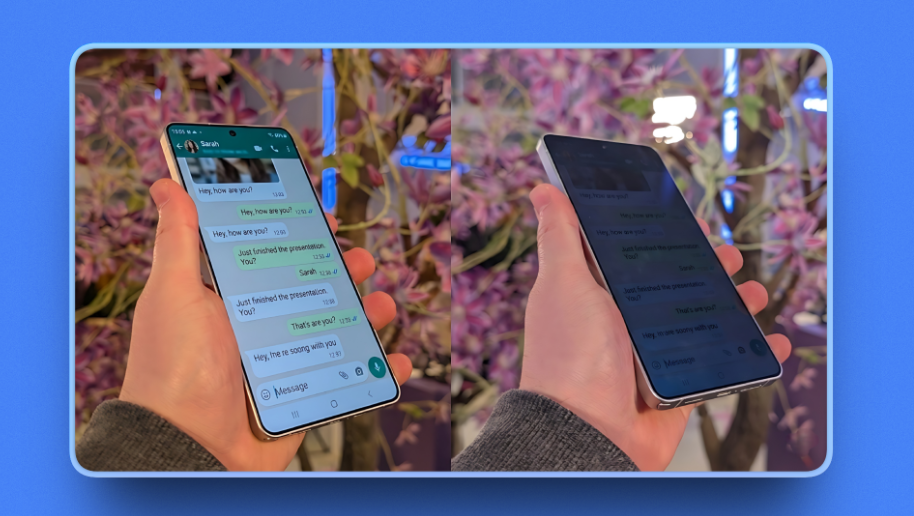
Pds:-Privacy Display is a simple screen dimming tool that helps reduce screen visibility when you tilt your device. It applies a dark overlay to your screen based on motion sensor input, allowing you to quickly lower screen brightness beyond the system minimum.
This app is designed for users who want a quick way to dim their screen in public places or low-light environments. In today’s hyper-connected world, launching an online business is more appealing than ever. Whether you’re looking to escape the 9-to-5 grind or tap into a rising market trend, the internet provides countless opportunities for creative entrepreneurs. Below are some of the most promising online business ideas that can thrive in the current digital environment:
E-Commerce Ventures Online retail continues to boom, opening doors for anyone eager to build a digital storefront. Platforms like Shopify, Etsy, and WooCommerce make it easy to launch an online store—whether you’re selling custom-made goods or niche products. Success in this space often hinges on product uniqueness, excellent user experience, and strategic digital marketing.
Online Coaching & Consulting If you’re knowledgeable in areas like business, fitness, or personal development, offering virtual coaching or consulting can be highly rewarding. Tools such as Zoom for meetings, Teachable for courses, and social media for outreach make it simple to connect with a global audience.
Digital Marketing Services Companies of all sizes are investing heavily in online marketing. If you’ve got skills in SEO, content creation, social media, or PPC ads, offering digital marketing services can become a solid income stream. Both agencies and solo freelancers thrive by boosting their clients’ online reach.
Affiliate Marketing This model allows you to earn commissions by promoting other companies’ products. By building a blog, website, or social presence around a specific niche, you can attract interested buyers. A strong grasp of SEO and content strategy is essential for success in affiliate marketing.
Dropshipping Businesses With dropshipping, you sell products without handling inventory. Suppliers manage the packaging and shipping, while you focus on sales and customer support. Choosing high-demand niche products and reliable suppliers is key.
Content Creation Bloggers, YouTubers, podcasters, and influencers can generate revenue through ads, sponsorships, merch, and more. To succeed, focus on consistently delivering engaging content and diversifying your income streams.
SaaS (Software as a Service) Tech-savvy entrepreneurs can develop software solutions and offer them via subscription models. Identifying a clear problem and building an intuitive, scalable app is crucial. Hosting platforms like AWS and Google Cloud support rapid growth.
Online Fitness & Wellness Virtual training has surged, making it a great time to offer fitness coaching, yoga sessions, or nutrition plans. Apps like Trainerize and platforms like Instagram or TikTok help you reach and retain clients.
Freelance Services Freelancing offers flexibility and allows you to monetize skills like writing, design, or web development. Sites like Upwork, Fiverr, and Freelancer connect you with clients looking for remote expertise.
Virtual Assistance Businesses increasingly rely on virtual assistants to handle tasks like admin work, customer support, or social media. Niche-specific VA services can become scalable, efficient alternatives to traditional staff.
The digital world is packed with possibilities for those ready to innovate and adapt. Whether you’re drawn to online retail, coaching, content creation, or tech services, success lies in spotting a need, delivering value, and embracing the tools of digital entrepreneurship. With persistence and creativity, you can turn your idea into a thriving online business.
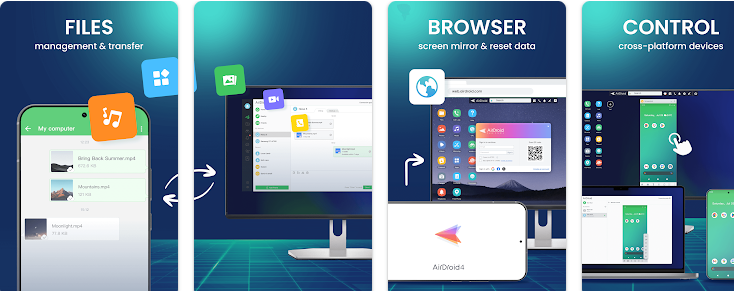
Ar2:-AirDroid is your best personal mobile device management suite, which is built on 10 years of non-stop improvements, including file transfer and management, screen mirroring, remote control, and receive SMS notifications right from your computer – all can be done with just one AirDroid app.
Major features: 1. Enjoy hyper-fast file transferring without limitations You can use AirDroid to enjoy the incredibly fast file-transferring speed at 20MB/s, under both local and remote connections. Enjoy the uncompromising experience for productivity even when switching to Wi-Fi, 4G, or 5G network. The nearby feature also allows you to instantly and directly send photos & video files to your nearby friends, even without an account or internet connection.
2. All-in-one file management From the desktop client or the web client web.airdroid.com, you can check up and manage photos, videos, music, apps, storage, and more on your devices. You can even automatically sync and upload your photos & videos to your PC, that way you can not only save up your device’s storage but also avoid the risk of having your privacy leaked.
3. Screen Mirroring Mirror your Android devices to pc wirelessly so that you can share your screen with your students or partners. You can also stream your broadcast with AirDroid, to share your games or pictures with your audience more efficiently. Screen mirroring doesn’t require the phones and the computer to be on the same network. A practical solution for various scenarios.
4. Remote Control Android devices You can take full control of your Android devices, without rooting your devices, just need to connect to the AirDroid PC client for a fast setting, to do whatever you want to do on your Android devices remotely, ex, play games, open an app, check the phone status. Remote control for AirDroid is easy to set up and runs smoothly even if your device is on the other side of the globe. *If you need to remote control an Android device from another Android device, you need to download AirMirror for the controller device.
5. Remote Monitoring Make use of unused Android phones and have them be your eyes by using the remote camera feature. Monitor the device surroundings, or listen in on environmental sounds with One-Way Audio, so you don’t need to stay on the screen at all times. You can check in on newborns and pets or safeguard your home, all without spending extra on new cameras.
5. Notifications & SMS Management AirDroid helps you focus on work by letting you manage the phone right from your computer. You can receive and send texts, connect to headsets, enter or copy the phone number and make the call right from the computer. The Notification feature allows you to sync your phone’s app notifications (such as WhatsApp, Line, and Facebook Messenger) to the computer, and you can directly reply to them on your desktop. Important messages are always up-to-date.
6. Make calls on PC You can import phone numbers in bulk directly on the AirDroid desktop client, click to call, and talk to your customers or friends through the handset or Bluetooth headset of the phone. AirDroid helps you avoids the trouble of manually entering phone numbers on mobile phones and possible errors, and improves your efficiency.
FAQs: Q: Do I have to register an account to use AirDroid? A: With an AirDroid account, you can enjoy all the features under the local and remote connection. If you don’t want to register, you can use AirDroid under the same wifi with limited features.
Q: Does AirDroid free to use? A: You can use AirDroid for free under the local area network. When running under a non-local network, the free account has a 200MB/month data limit and cannot use the remote camera. We recommend that you upgrade to premium to enjoy unlimited remote data and unlock all functions and services.
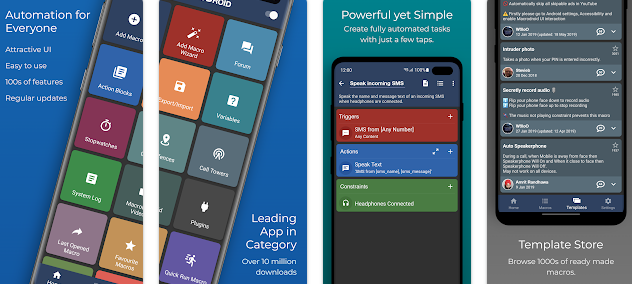
Mc2:- MacroDroid is the easiest way to automate tasks on your Android smartphone or tablet. Via the straightforward user interface MacroDroid makes it possible to build fully automated tasks in just a few taps.
A few examples of how MacroDroid can help you to get automated:
# Manage files on your device, for example automating file copying, moving and deleting to keep your file system clean. # Auto reject incoming calls when in a meeting (as set in your calendar). # Increase safety while commuting by reading your incoming notifications and messages (via Text to Speech) and send automated responses via email or SMS. # Optimize your daily workflow on your phone; switch on bluetooth and start playing music when you enter your car. Or switch on WiFi when near your house. # Reduce battery drain (e.g. dim screen and switch Wifi off) # Make custom sound and notification profiles. # Remind you to do certain tasks using timers and stopwatches.
These are just a few examples out of limitless scenarios where MacroDroid can make your Android life a little easier. With only 3 simple steps this is how it works:
1. Select a Trigger.
The trigger is the cue for the macro to start. MacroDroid offers over 80 triggers to start your macro, i.e. location based triggers (like GPS, cell towers, etc), device status triggers (like battery level, app starting/closing), sensor triggers (like shaking, light levels, etc) and connectivity triggers (like Bluetooth, Wifi and Notifications). You can also create a shortcut on the homescreen of your device or run using the unique and customizable Macrodroid sidebar.
2. Select the Actions you like to automate.
MacroDroid can perform over 100 different actions, that you typically would do by hand. Connect to your Bluetooth or Wifi device, select volume levels, speak text (like your incoming notifications or current time), start a timer, dim your screen, run Tasker plugin and many more.
3. Optionally: Configure Constraints.
Constraints help you to let the macro fire only when you want it to. Living near your work, but only want to connect to your company’s Wifi during work days? With a constraint you can select specific times or days that the macro can be invoked. MacroDroid offers over 50 constraint types.
MacroDroid is compatible with Tasker and Locale plugins to expand the range of possibilities even further.
= For beginners =
MacroDroid’s unique interface offers a Wizard that guides step by step through the configuration of your first macros. It is also possible to use an existing template from the template section and customize it to your needs. The built-in forum allows you to get help from other users, allowing you to easy learn the ins and outs of MacroDroid.
= For more experienced users =
MacroDroid offers more comprehensive solutions like the use of Tasker and Locale plugins, system/user defined variables, scripts, intents, advance logic like IF, THEN, ELSE clauses, use of AND/OR
The free version of MacroDroid is ad-supported and allows up to 5 macros. The Pro version (a small one time fee) removes all adverts and allows an unlimited amount of macros.
= Support =
Please use the in-app forum for all usage questions and feature requests, or access via www.macrodroidforum.com.
To report bugs please use the built in ‘Report a bug’ option available via the troubleshooting section.
= Accessibility Services =
MacroDroid makes use of accessibility services for certain features like automating UI Interactions. use of accessibility services is entirely at the users discretion. No user data is ever obtained or logged from any accessibility service.
= Wear OS =
This app contains a Wear OS companion app for interaction with MacroDroid. This is not a standalone app and requires the phone application installed. The Wear OS app supports complications populated by MacroDroid to use along with your watch face of choice.
In today’s hyper-connected world, launching an online business is more appealing than ever. Whether you’re looking to escape the 9-to-5 grind or tap into a rising market trend, the internet provides countless opportunities for creative entrepreneurs. Below are some of the most promising online business ideas that can thrive in the current digital environment:
E-Commerce Ventures Online retail continues to boom, opening doors for anyone eager to build a digital storefront. Platforms like Shopify, Etsy, and WooCommerce make it easy to launch an online store—whether you’re selling custom-made goods or niche products. Success in this space often hinges on product uniqueness, excellent user experience, and strategic digital marketing.
Online Coaching & Consulting If you’re knowledgeable in areas like business, fitness, or personal development, offering virtual coaching or consulting can be highly rewarding. Tools such as Zoom for meetings, Teachable for courses, and social media for outreach make it simple to connect with a global audience.
Digital Marketing Services Companies of all sizes are investing heavily in online marketing. If you’ve got skills in SEO, content creation, social media, or PPC ads, offering digital marketing services can become a solid income stream. Both agencies and solo freelancers thrive by boosting their clients’ online reach.
Affiliate Marketing This model allows you to earn commissions by promoting other companies’ products. By building a blog, website, or social presence around a specific niche, you can attract interested buyers. A strong grasp of SEO and content strategy is essential for success in affiliate marketing.
Dropshipping Businesses With dropshipping, you sell products without handling inventory. Suppliers manage the packaging and shipping, while you focus on sales and customer support. Choosing high-demand niche products and reliable suppliers is key.
Content Creation Bloggers, YouTubers, podcasters, and influencers can generate revenue through ads, sponsorships, merch, and more. To succeed, focus on consistently delivering engaging content and diversifying your income streams.
SaaS (Software as a Service) Tech-savvy entrepreneurs can develop software solutions and offer them via subscription models. Identifying a clear problem and building an intuitive, scalable app is crucial. Hosting platforms like AWS and Google Cloud support rapid growth.
Online Fitness & Wellness Virtual training has surged, making it a great time to offer fitness coaching, yoga sessions, or nutrition plans. Apps like Trainerize and platforms like Instagram or TikTok help you reach and retain clients.
Freelance Services Freelancing offers flexibility and allows you to monetize skills like writing, design, or web development. Sites like Upwork, Fiverr, and Freelancer connect you with clients looking for remote expertise.
Virtual Assistance Businesses increasingly rely on virtual assistants to handle tasks like admin work, customer support, or social media. Niche-specific VA services can become scalable, efficient alternatives to traditional staff.
The digital world is packed with possibilities for those ready to innovate and adapt. Whether you’re drawn to online retail, coaching, content creation, or tech services, success lies in spotting a need, delivering value, and embracing the tools of digital entrepreneurship. With persistence and creativity, you can turn your idea into a thriving online business.
Photomath is known worldwide for helping millions of learners to learn, practice, and understand math – one step at a time.
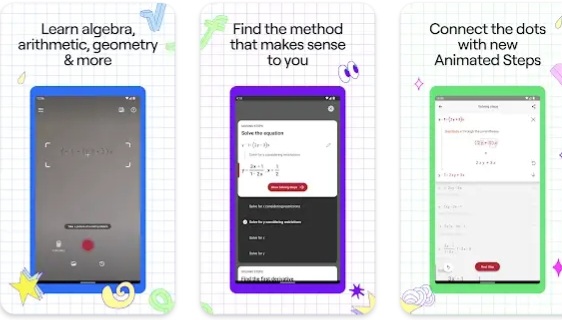
Scan any math problem with the Photomath app to get step-by-step explanations with accurate solutions and a variety of teacher-approved methods. Math is about the process, so Photomath breaks your problem into bite-sized steps to help you understand the “what” and “why” along with the “how.” Whether you’re learning basic arithmetic or advanced geometry, we’ll tackle it together, step by step.
Why Photomath?
Billions of math problems: From elementary arithmetic to advanced calculus and everything in between, Photomath can solve billions of math problems—including word problems! Whether handwritten, in a textbook, or on a screen, Photomath is here to help you untangle your trickiest problem.
Step-by-step explanations: Math isn’t just about an answer. It’s about every step along the way. That’s why Photomath breaks down each step, so you can really learn. Less guesswork = less stress, especially with our new Animated Steps, which show you the exact progression of a particular step. Get basic step-by-step explanations at no charge when you download Photomath.
Expert-developed methods: Photomath’s educational content is centered around the learner’s experience, driven by the expertise of our own team of mathematicians and former math teachers.
Self-paced learning: Photomath’s instant support is like having a 24/7 virtual tutor. Checking your homework before dinner? Stuck on a problem at 2am? We can help. Follow our detailed steps, taking whatever time you need to review definitions, rationale, and more – all within the explanation.
Want to dive deeper and explore more ways to learn? Photomath Plus can get you there with custom Animated Tutorials, detailed Textbook Solutions, and more!
KEY FEATURES
Step-by-step explanations included in our basic version (free of charge)
Word problem instructions
Interactive graphs
Video learning
Multiple solution methods
Advanced scientific calculator
Photomath is for learners of all levels, including those studying: Numbers & Quantity Algebra Functions Trigonometry & Angles Sequences Geometry Calculus
“The step-by-step guide is beneficial to students that do not have access to a tutor and struggle with solving math problems.” — Forbes
“A viral video about a new app looks like a dream come true for anyone who struggles with math.” — Time
Payment will be charged to your Google account at the confirmation of purchase.
A subscription automatically renews unless it’s canceled at least 24 hours before the end of the current billing period.
Your account will be charged for renewal within 24 hours prior to the end of the current period.
Manage or cancel your subscription in your account settings on the Google Play after purchase.
Offers and pricing are subject to change without notice.